Add Menu Search to the Admin Panel Left Navigation Bar

srsakib

Active Member
I would like to request a menu search feature for the Clientexec admin dashboard, specifically inside the left navigation bar.

Currently, admins need to go through multiple menus and submenus to find a specific option. This can take extra time, especially when managing different sections such as clients, invoices, packages, domains, support, or settings.

Adding a search bar at the top of the admin panel’s left navigation menu would allow admins to quickly search for the desired menu item and navigate directly to it.

For example, if an admin searches for “invoice,” “clients,” “packages,” “settings,” or “domains,” the matching admin menu items could appear instantly.

This feature would improve:
  1. Admin panel usability
  2. Navigation speed
  3. Admin workflow efficiency
  4. Access to deeply nested admin settings
  5. Overall management experience inside the admin area
Thank you
 
Hello,

I got a small plugin for this, you can download it here:

AdminSearchMenu

You need to upload it in the /plugins/snapin/ directory in ClientExec, and enable the snapin in the admin settings page. If you need to change anything you can edit the css and js file in the assets folder.

The code is using JS code to inject the search menu in the admin sidebar, because there is no native way to do it.
 
Hello,

I got a small plugin for this, you can download it here:

AdminSearchMenu

You need to upload it in the /plugins/snapin/ directory in ClientExec, and enable the snapin in the admin settings page. If you need to change anything you can edit the css and js file in the assets folder.

The code is using JS code to inject the search menu in the admin sidebar, because there is no native way to do it.
Hi,
Thank you so much. It works fine.

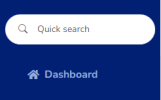
I made a small tweak to improve the UI.

1778472073673.png

CSS Changes:

CSS:
.ceas-menu-search-wrapper {
    background: var(--bs-body-bg);
    border-bottom: 1px solid var(--bs-body-bg);
    margin-bottom: 0.25rem;
    padding: 0.5rem 0.75rem !important;
    position: relative;
    border-radius: 2rem;
     margin: 0 0.5rem 1rem 0.5rem;
}

But the PHP file (PluginAdminsearchmenu.php) is encoded.

Is your plugin safe to use?
 

Attachments

Hi,
Thank you so much. It works fine.

I made a small tweak to improve the UI.

View attachment 1650

CSS Changes:

CSS:
.ceas-menu-search-wrapper {
    background: var(--bs-body-bg);
    border-bottom: 1px solid var(--bs-body-bg);
    margin-bottom: 0.25rem;
    padding: 0.5rem 0.75rem !important;
    position: relative;
    border-radius: 2rem;
     margin: 0 0.5rem 1rem 0.5rem;
}

But the PHP file (PluginAdminsearchmenu.php) is encoded.

Is your plugin safe to use?
The full source is found here, I also included the radius change in the code.


We can stay in this topic for questions or changes, will keep the code updated on the website.
 
The full source is found here, I also included the radius change in the code.


We can stay in this topic for questions or changes, will keep the code updated on the website.
Hi,
Thanks for being transparent.

You already did a great job!
 
Back
Top